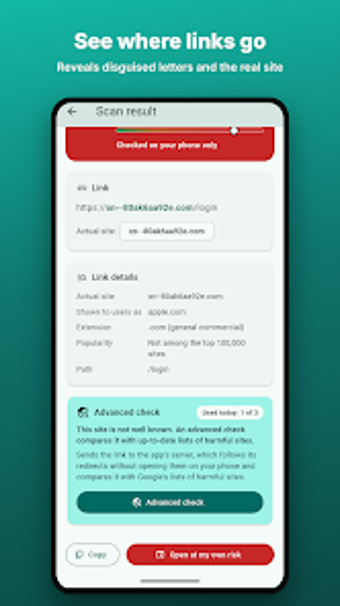
QR Secure Check inspects QR links and flags hidden phishing risks
Scan QR codes with preemptive security checks: camera and gallery capture, on-device risk scoring, and optional server-side redirect tracing. QR Secure Check, from Ahmed Nagy, sits in the Android utilities category and directs link traffic through a protective step before opening. Key capabilities include typo-squatting detection, redirect tracking, and multi-language support. The app suits security-conscious mobile users who scan public codes or receive links in messages and want a privacy-first inspection layer.
What level of protection does the app provide when you scan a code?
QR Secure Check decodes camera and screenshot QR inputs and runs an on-device analysis that produces a 0–100 risk score, with plain-language explanations for indicators like look-alike domains or unencrypted connections. In addition, an advanced server-side check traces redirects safely through a remote service to reveal hidden final destinations without exposing your device directly to the target URL.
Does it affect device performance or operate safely in everyday use?
The app performs initial checks locally, which preserves privacy and avoids sending every scan off-device. That on-device-first design reduces external queries for routine scans. The product also stores scan history only on the phone and offers a clear option to erase it, which limits persistent data on the device. The review notes the separation between local checks and optional remote tracing for higher-risk links.
Is it approachable for non-technical users and suitable for regular scanning workflows?
Language support across 16 languages and automatic switching simplifies use in multilingual settings. The interface supports both live camera scanning and gallery screenshots, making it practical for posters, menus, and forwarded images. The Link Protection mode can intercept links from other apps when the user enables it, so casual users can protect ordinary tapping workflows without manual URL inspection.
Strong for security-minded mobile users, with one practical trade-off
The app fits users who prioritize avoiding QR-based phishing because it focuses on detectable obfuscation techniques and keeps initial checks on-device. A single trade-off is that protecting links from other apps requires changing how your device handles tapped links, which some users may find intrusive. For routine public scanning keep the app active only when you expect to check unfamiliar codes.